

1.相对路径挂载图片【文章显示】
-
在
_config.yml文件中配置post_asset_folder1
2
3
4post_asset_folder: true
marked:
prependRoot: true
postAsset: true💬配置之后,当执行
hexo new titleName之后,会在该titleName.md文件夹的同级目录下生成一个同名文件夹用来存放图片资源。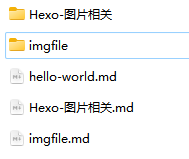
-
.md文件中使用1

💬
hexo-renderer-marked默认渲染引擎,通过hexo g之后,会将该图片路径渲染成绝对路径。在文章列表中,无法加载图片。
2.绝对路径挂载图片【主页显示】
-
在
source文件夹下,创建一个img文件夹用来存放图片 -
.md文件中使用1

💬
/img代表根目录下的img文件夹,其中/指代根目录【public文件夹】
3.同时显示
-
安装
hexo-asset-image1
npm hexo-asset-image --save
-
安装之后,发现图片路径都不显示了,
F12查看图片路径变成了/.io//xxx.xx。 -
修复上述bug。进入到
node_modules找到hexo-asset-image插件,用下述代码替换掉index.js原有代码。1
2
3
4
5
6
7
8
9
10
11
12
13
14
15
16
17
18
19
20
21
22
23
24
25
26
27
28
29
30
31
32
33
34
35
36
37
38
39
40
41
42
43
44
45
46
47
48
49
50
51
52
53
54
55
56
57
58
59;
var cheerio = require("cheerio");
// http://stackoverflow.com/questions/14480345/how-to-get-the-nth-occurrence-in-a-string
function getPosition(str, m, i) {
return str.split(m, i).join(m).length;
}
var version = String(hexo.version).split(".");
hexo.extend.filter.register("after_post_render", function (data) {
var config = hexo.config;
if (config.post_asset_folder) {
var link = data.permalink;
if (version.length > 0 && Number(version[0]) == 3)
var beginPos = getPosition(link, "/", 1) + 1;
else var beginPos = getPosition(link, "/", 3) + 1;
// In hexo 3.1.1, the permalink of "about" page is like ".../about/index.html".
var endPos = link.lastIndexOf("/") + 1;
link = link.substring(beginPos, endPos);
var toprocess = ["excerpt", "more", "content"];
for (var i = 0; i < toprocess.length; i++) {
var key = toprocess[i];
var $ = cheerio.load(data[key], {
ignoreWhitespace: false,
xmlMode: false,
lowerCaseTags: false,
decodeEntities: false,
});
$("img").each(function () {
if ($(this).attr("src")) {
// For windows style path, we replace '\' to '/'.
var src = $(this).attr("src").replace("\\", "/");
if (!/http[s]*.*|\/\/.*/.test(src) && !/^\s*\//.test(src)) {
// For "about" page, the first part of "src" can't be removed.
// In addition, to support multi-level local directory.
var linkArray = link.split("/").filter(function (elem) {
return elem != "";
});
var srcArray = src.split("/").filter(function (elem) {
return elem != "" && elem != ".";
});
if (srcArray.length > 1) srcArray.shift();
src = srcArray.join("/");
$(this).attr("src", config.root + link + src);
console.info &&
console.info("update link as:-->" + config.root + link + src);
}
} else {
console.info && console.info("no src attr, skipped...");
console.info && console.info($(this));
}
});
data[key] = $.html();
}
}
}); -
替换之后,重新
hexo g即可。
4.支持emoji
hexo-renderer-marked默认渲染引擎并不支持emoji,却换到可以支持的渲染引擎。笔者使用的是 hexo-renderer-markdown-it。
1 | npm un hexo-renderer-marked --save |
在 _config.yml文件中配置:
1 | # hexo-renderer-markdown-it |
参考: