

Sentinel
Sentinel是redis的高可用性(high availability)解决方案:由一个或者多个Sentinel实例(instance)组成的Sentinel系统,可以监视任意多个主服务器,以及这些主服务器属下的所用从服务器,并在被监视的主服务器进入下线状态时,自动将下线的主服务器属下的某个从服务器升级为新的主服务器,然后由新的主机服务器代替已下线的主服务器继续处理命令请求。
启动并初始化
当一个Sentinel启动时,它需要执行以下步骤:
- 初始化服务器。
- 将普通Redis服务器使用的代码替换成Sentinel专用代码。
- 初始化Sentinel状态。
- 根据给定的配置文件,初始化Sentinel的监视主服务器列表。
- 创建连向主服务器的网络连接。
初始化服务器
sentinel本质上只是一个运行在特殊模式下的redis服务器,所以启动sentinel的第一步是初始化一个普通的redis服务器。只不过这个服务器不会载入RDB文件或者AOF文件。
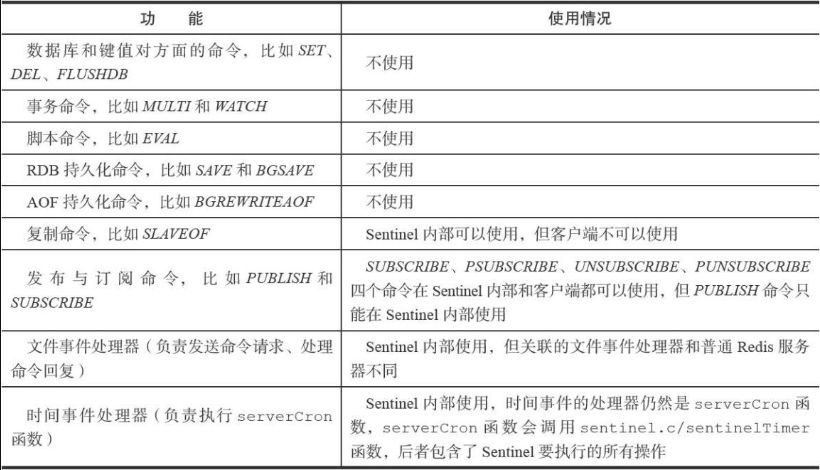
使用专用代码
例如sentinel.c文件中定义了默认的sentinel端口#define REDIS_SENTINEL_PORT 26379;
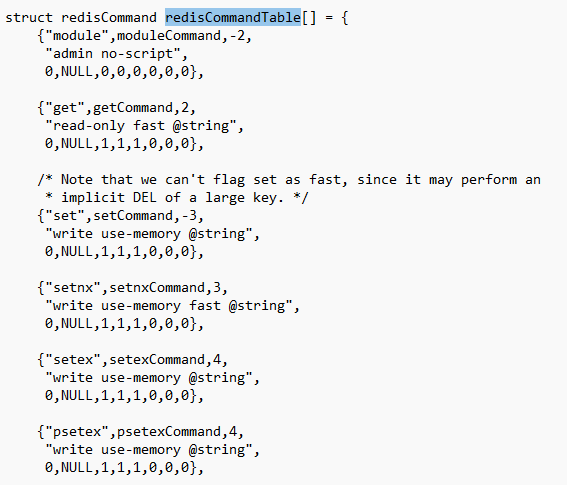
除此之外:普通服务器使用的命令表(service.c文件中【6.0.6源码】):
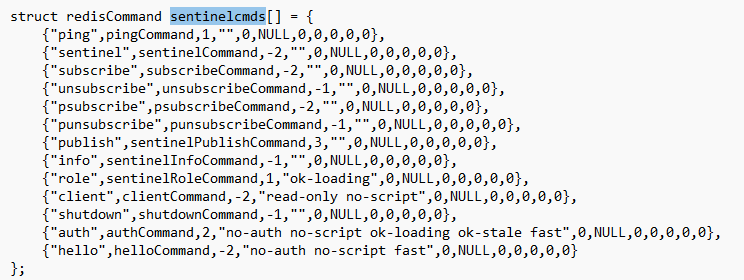
sentinel中的指令表:sentinel.c文件中
初始化sentinel
在应用了sentinel的专用代码之后,接下来,服务器会初始化一个sentinel.c/sentinelState,简称"sentinel状态"。这个结构保存了服务器中所有和sentinel功能有关的状态。
1 | /* Main state. */ |
初始化masters属性
sentinel状态中的masters字典记录了所有被sentinel坚实的主服务器的相关信息,其中
- 字典的键是被监视主服务器的名字
- 而字典的值则是被监视主服务器对应的
sentinel.c/sentinelRedisInstance
每个sentinelRedisInstance结构(实例结构)代表一个被sentinel监视的redis服务器实例(instance),这个实例可以是主服务器、从服务器或者另外一个sentinel。
实例结构包含的属性非常多,源码如下:
1 | typedef struct sentinelRedisInstance { |
其中sentinelRedisInstance.addr属性是一个指向sentinel.c/sentinelAddr结构的指针,这个结构保存着实例的IP地址和端口号:
1 | /* Address object, used to describe an ip:port pair. */ |
对Sentinel状态的初始化将引发对masters字典的初始化,而masters字典的初始化是根据被载入的Sentinel配置文件来进行的。
创建连向主服务器的网络连接
初始化Sentinel的最后一步是创建连向被监视主服务器的网络连接,Sentinel将成为主服务器的客户端,它可以向主服务器发送命令,并从命令回复中获取相关的信息。
初始化Sentinel的最后一步是创建连向被监视主服务器的网络连接,Sentinel将成为主服务器的客户端,它可以向主服务器发送命令,并从命令回复中获取相关的信息。
- 一个是命令连接,这个连接专门用于向主服务器发送命令,并接收命令回复。
- 另一个是订阅连接,这个连接专门用于订阅主服务器的
__sentinel__:hello频道
为什么有两个连接?在Redis目前的发布与订阅功能中,被发送的信息都不会保存在Redis服务器里面,如果在信息发送时,想要接收信息的客户端不在线或者断线,那么这个客户端就会丢失这条信息。因此,为了不丢失
__sentinel__:hello频道的任何信息,Sentinel必须专门用一个订阅连接来接收该频道的信息。另一方面,除了订阅频道之外,Sentinel还必须向主服务器发送命令,以此来与主服务器进行通信,所以Sentinel还必须向主服务器创建命令连接。因为Sentinel需要与多个实例创建多个网络连接,所以Sentinel使用的是异步连接。
获取主服务信息
Sentinel默认会以每十秒一次的频率,通过命令连接向被监视的主服务器发送INFO命令,并通过分析INFO命令的回复来获取主服务器的当前信息。
🔎例子:
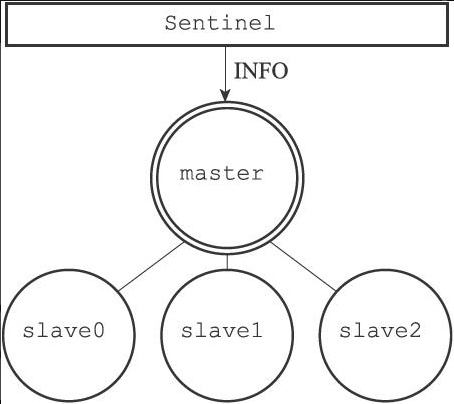
主服务器master有三个从服务器slave0、slave1和slave2,并且一个Sentinel正在连接主服务器,那么Sentinel将持续地向主服务器发送INFO命令,并获得类似于以下内容的回复:
1 | # Server |
通过分析主服务器返回的INFO命令回复,Sentinel可以获取以下两方面的信息:
- 关于主服务器本身的信息,包括run_id域记录的服务器运行ID,以及role域记录的服务器角色;
- 关于主服务器属下所有从服务器的信息,每个从服务器都由一个"slave"字符串开头的行记录,每行的ip=域记录了从服务器的IP地址,而port=域则记录了从服务器的端口号。根据这些IP地址和端口号,Sentinel无须用户提供从服务器的地址信息,就可以自动发现从服务器。
根据run_id域和role域记录的信息,Sentinel将对主服务器的实例结构进行更新,例如,主服务器重启之后,它的运行ID就会和实例结构之前保存的运行ID不同,Sentinel检测到这一情况之后,就会对实例结构的运行ID进行更新。
至于主服务器返回的从服务器信息,则会被用于更新主服务器实例结构的slaves字典,这个字典记录了主服务器属下从服务器的名单:
- 字典的键是由Sentinel自动设置的从服务器名字,格式为
ip:port:如对于IP地址为127.0.0.1,端口号为11111的从服务器来说,Sentinel为它设置的名字就是127.0.0.1:11111。 - 至于字典的值则是从服务器对应的实例结构:比如说,如果键是
127.0.0.1:11111,那么这个键的值就是IP地址为127.0.0.1,端口号为11111的从服务器的实例结构。
Sentinel在分析INFO命令中包含的从服务器信息时,会检查从服务器对应的实例结构是否已经存在于slaves字典:
- 如果从服务器对应的实例结构已经存在,那么Sentinel对从服务器的实例结构进行更新。
- 如果从服务器对应的实例结构不存在,那么说明这个从服务器是新发现的从服务器,Sentinel会在slaves字典中为这个从服务器新创建一个实例结构。
对于之前列举的主服务器master和三个从服务器slave0、slave1和slave2的例子来说,Sentinel将分别为三个从服务器创建它们各自的实例结构,并将这些结构保存到主服务器实例结构的slaves字典里面:
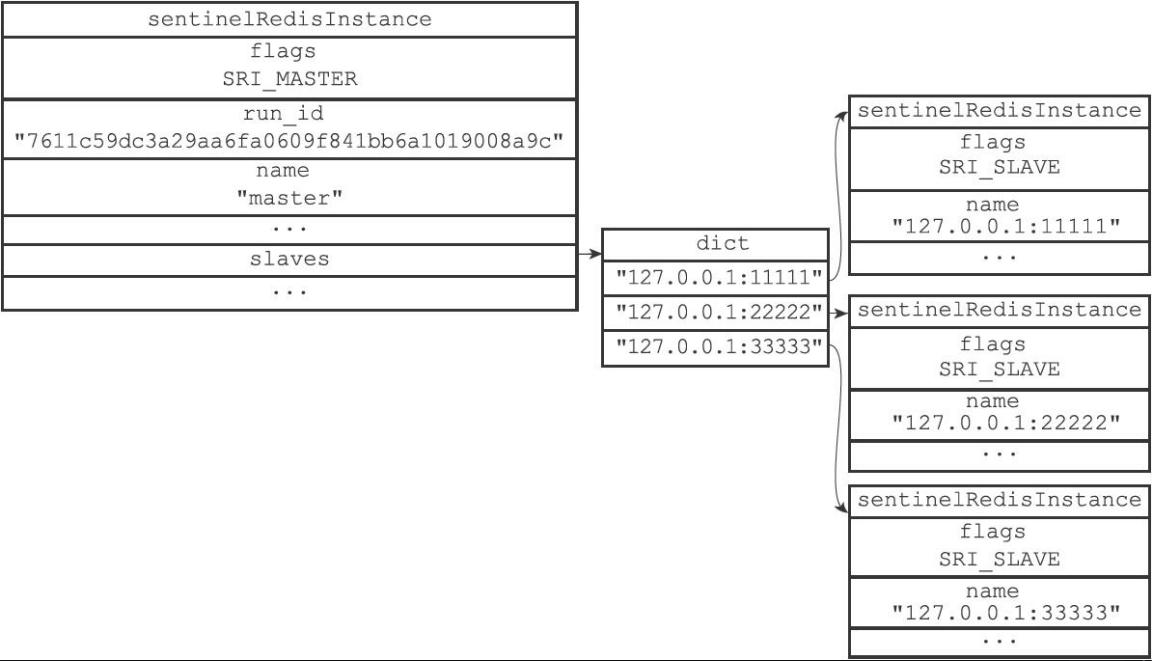
注意对比图中主服务器实例结构和从服务器实例结构之间的区别:
- 主服务器实例结构的flags属性的值为SRI_MASTER,而从服务器实例结构的flags属性的值为SRI_SLAVE。
- 主服务器实例结构的name属性的值是用户使用Sentinel配置文件设置的,而从服务器实例结构的name属性的值则是Sentinel根据从服务器的IP地址和端口号自动设置的。
获取从服务器信息
当Sentinel发现主服务器有新的从服务器出现时,Sentinel除了会为这个新的从服务器创建相应的实例结构之外,Sentinel还会创建连接到从服务器的命令连接和订阅连接。
🔎例子:
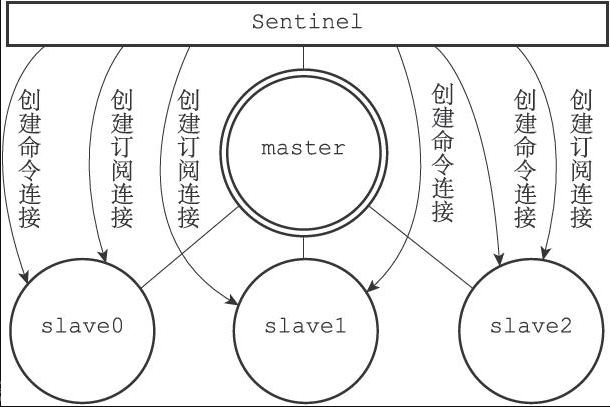
在创建命令连接之后,Sentinel在默认情况下,会以每十秒一次的频率通过命令连接向从服务器发送INFO命令,并获得类似于以下内容的回复:
1 | # Server |
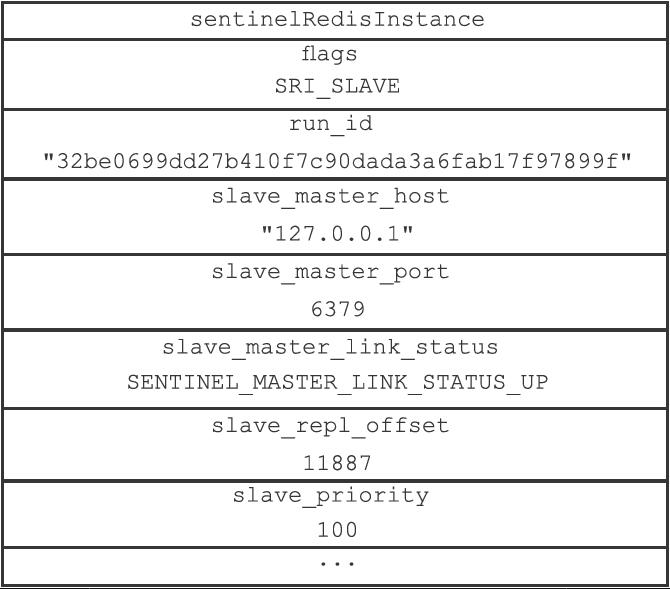
根据INFO命令的回复,Sentinel会提取出以下信息:
- 从服务器的运行ID run_id。
- 从服务器的角色role。
- 主服务器的IP地址master_host,以及主服务器的端口号master_port。
- 主从服务器的连接状态master_link_status。
- 从服务器的优先级slave_priority。
- 从服务器的复制偏移量slave_repl_offset。
根据这些信息,Sentinel会对从服务器的实例结构进行更新,更新之后的结构样子:
向主服务器和从服务器发送信息
在默认情况下,Sentinel会以每两秒一次的频率,通过命令连接向所有被监视的主服务器和从服务器发送以下格式的命令:
1 | PUBLISH __sentinel__:hello "<s_ip>,<s_port>,<s_runid>,<s_epoch>,<m_name>,<m_ip>,<m_port>,<m_epoch>" |
这条命令向服务器的__sentinel__:hello频道发送了一条信息,信息的内容由多个参数组成:
- 以s_开头的参数记录的是Sentinel本身的信息
- m_开头的参数记录的则是主服务器的信息。如果Sentinel正在监视的是主服务器,那么这些参数记录的就是主服务器的信息;如果Sentinel正在监视的是从服务器,那么这些参数记录的就是从服务器正在复制的主服务器的信息
参数表:
| 参数 | 意义 |
|---|---|
a_ip |
Sentinel的IP地址 |
a_port |
Sentinel的端口号 |
s_runid |
Sentinel的运行ID |
s_epoch |
Sentinel当前的Configuration epoch【配置纪元】 |
m_name |
主服务器的名字 |
m_ip |
主服务器的IP地址 |
m_port |
主服务器的端口号 |
m_epoch |
主服务器当前的配置纪元 |
检查主观下线状态
在默认情况下,Sentinel会以每秒一次的频率向所有与它创建了命令连接的实例(包括主服务器、从服务器、其他Sentinel在内)发送PING命令,并通过实例返回的PING命令回复来判断实例是否在线。
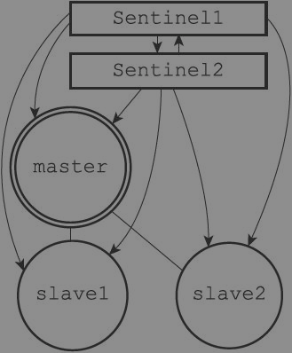
如上图中,Sentinel1将向Sentinel2、主服务器master、从服务器slave1和slave2发送PING命令。Sentinel2将向Sentinel1、主服务器master、从服务器slave1和slave2发送PING命令。实例对ping命令的回复可以分成以下两种情况:
- 有效回复:实例返回
+PONG、-LOADING、-MASTERDOWN三种回复其中一种。 - 无效回复:实例返回
+PONG、-LOADING、-MASTERDOWN三种回复之外的其他回复,或者在指定时限内没有返回任何回复。
Sentinel配置文件中的down-after-milliseconds选项指定了Sentinel判断实例进入主观下线所需的时间长度:如果一个实例在down-after-milliseconds毫秒内,连续向Sentinel返回无效回复,那么Sentinel会修改这个实例所对应的实例结构,在结构的flags属性中打开SRI_S_DOWN标识,以此来表示这个实例已经进入主观下线状态。
用户设置的down-after-milliseconds选项的值,不仅会被Sentinel用来判断主服务器的主观下线状态,还会被用于判断主服务器属下的所有从服务器,以及所有同样监视这个主服务器的其他Sentinel的主观下线状态。举个例子,如果用户向Sentinel设置了以下配置:
1 | sentinel monitor master 127.0.0.1 6379 2 |
那么50000毫秒不仅会成为Sentinel判断master进入主观下线的标准,还会成为Sentinel判断master属下所有从服务器,以及所有同样监视master的其他Sentinel进入主观下线的标准。
多个Sentinel设置的主观下线时长可能不同:
down-after-milliseconds选项另一个需要注意的地方是,对于监视同一个主服务器的多个Sentinel来说,这些Sentinel所设置的down-after-milliseconds选项的值也可能不同,因此,当一个Sentinel将主服务器判断为主观下线时,其他Sentinel可能仍然会认为主服务器处于在线状态。举个例子,如果Sentinel1载入了以下配置:
1 | sentinel monitor master 127.0.0.1 6379 2 |
而Sentinel2则载入了以下配置:
1 | sentinel monitor master 127.0.0.1 6379 2 |
那么当master的断线时长超过10000毫秒之后,Sentinel2会将master判断为主观下线,而Sentinel1却认为master仍然在线。只有当master的断线时长超过50000毫秒之后,Sentinel1和Sentinel2才会都认为master进入了主观下线状态。
检查客观下线状态
当Sentinel将一个主服务器判断为主观下线之后,为了确认这个主服务器是否真的下线了,它会向同样监视这一主服务器的其他Sentinel进行询问,看它们是否也认为主服务器已经进入了下线状态(可以是主观下线或者客观下线)。当Sentinel从其他Sentinel那里接收到足够数量的已下线判断之后,Sentinel就会将从服务器判定为客观下线,并对主服务器执行故障转移操作。
Sentinel使用 SENTINEL is-master-down-by-addr <ip> <port> <current_epoch> <runid>命令询问其他Sentinel是否同意主服务器已下线。
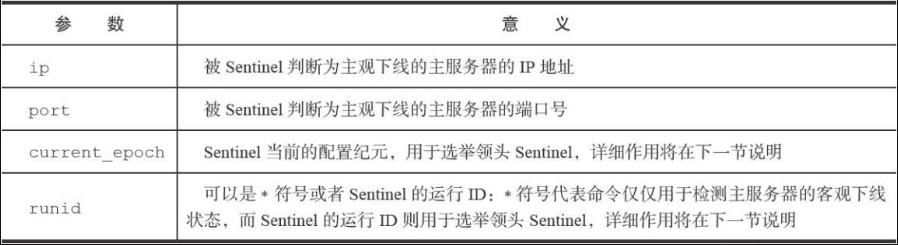
当目标Sentinel接收到源Sentinel发来的 SENTINEL is-master-down-by命令包时,目标Sentinel会分析并取出命令请求中包含的各个参数,并根据其中的主服务器IP和端口号,检查主服务器是否已下线,然后向源Sentinel返回一条包含三个三叔的MultiBulk回复。
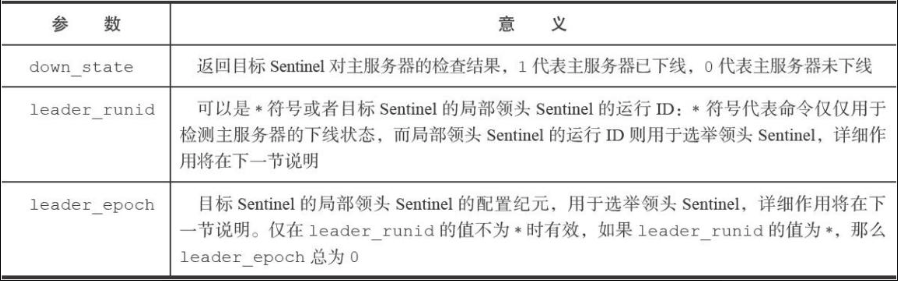
根据其他Sentinel发回的SENTINEL is-master-down-by命令回复,Sentinel将统计其他Sentinel同意主服务器已下线的数量,当这一数量达到配置指定的判断客观下线所需要的数量时,Sentinel鬼将主服务器实例结构flags属性的SRI_O_DOWN标识打开,标识主服务器已经进入客观下线状态。
客观下线状态的判断条件:
当认为主服务器已经进入下线状态的Sentinel的数量,超过Sentinel配置中设置的quorum参数的值,那么该Sentinel就会认为主服务器已经进入客观下线状态。
比如,sentinel启动时加载下述配置:
1 | sentinel monitor master 127.0.0.1 6379 2 |
意味着 包括当前sentinel在内,只要总共有两个sentinel认为主服务器已经进入下线状态,那么当前sentinel就将主服务器判断为客观下线。
在同一个sentinel服务系统中,不同的sentinel实例可以有不同的判断客观下线条件。
选举领头Sentinel
当一个主服务器被判断为客观下线时,监视这个下线主服务器的各个Sentinel会进行协商,选举出一个领头Sentinel,并由领头Sentinel对下线主服务器执行故障转移操作。
// 待续
故障转移
在选举产生出领头Sentinel之后,领头Sentinel将对已下线的主服务器执行故障转移操作,该操作包含以下三个步骤:
- 在已下线主服务器属下的所有从服务器里面,挑选出一个从服务器,并将其转换为主服务器。
- 让已下线主服务器属下的所有从服务器改为复制新的主服务器。
- 将已下线主服务器设置为新的主服务器的从服务器,当这个旧的主服务器重新上线时,它就会成为新的主服务器的从服务器。
// 待续
案例
🔍环境:redis 3.2.1/windows;目标:构建一主二从三哨兵的哨兵系统。
-
准备redis windows版本 redis windows社区 🔗笔者提供 提取码:emj2 redis官方
-
复制三份代码,其中一份做master,另外两份做slave
-
master配置
-
redis.windows.conf1
port 6380
-
sentinel.conf1
2
3
4
5
6
7
8
9
10
11
12
13当前Sentinel服务运行的端口
port 26380
master
Sentinel去监视一个名为mymaster的主redis实例,这个主实例的IP地址为本机地址127.0.0.1,端口号为6379,
而将这个主实例判断为失效至少需要2个 Sentinel进程的同意,只要同意Sentinel的数量不达标,自动failover就不会执行
sentinel monitor mymaster 127.0.0.1 6380 1
指定了Sentinel认为Redis实例已经失效所需的毫秒数。当 实例超过该时间没有返回PING,或者直接返回错误,那么Sentinel将这个实例标记为主观下线。
只有一个 Sentinel进程将实例标记为主观下线并不一定会引起实例的自动故障迁移:只有在足够数量的Sentinel都将一个实例标记为主观下线之后,实例才会被标记为客观下线,这时自动故障迁移才会执行
sentinel down-after-milliseconds mymaster 5000
指定了在执行故障转移时,最多可以有多少个从Redis实例在同步新的主实例,在从Redis实例较多的情况下这个数字越小,同步的时间越长,完成故障转移所需的时间就越长
sentinel config-epoch mymaster 12
如果在该时间(ms)内未能完成failover操作,则认为该failover失败
sentinel leader-epoch mymaster 13
-
-
slave配置
-
redis.windows.conf1
2
3另一台是6382
port 6381
slaveof 127.0.0.1 6380 -
sentinel.conf1
2
3
4
5
6
7
8
9
10slave1 哨兵运行的端口
port 26381
slave2 哨兵运行的端口
port 26382
slave
sentinel monitor mymaster 127.0.0.1 6380 1
sentinel down-after-milliseconds mymaster 5000
sentinel config-epoch mymaster 12
sentinel leader-epoch mymaster 13
-
-
运行
-
启动服务bat
1
2
3假如你使用记事本来编写这个bat,中文会乱码;推荐使用notepad+,将编码格式改为ANSI
title "6380服务端"
redis-server.exe redis.windows.conf
-
-
哨兵启动bat
1
2title sentinel-6380
redis-server.exe sentinel.conf --sentinel -
客户端启动bat
1
2title "6380客户端"
redis-cli.exe -h 127.0.0.1 -p 6380 -
连接到哨兵
1
2redis-cli.exe -h 127.0.0.1 -p 26381
info replication -
断开6380,可以观察到,某一台slave成为了主服务器;重新连接6380,变成从服务器
头脑风暴
❓假设现在有一套redis sentinel服务系统,假设客户端向服务器发送命令,这时主服务器宕机了,这条命令会怎么样?
在主服务器宕机期间,客户端可能会收到一些错误信息或超时提示,这是因为主服务器已经宕机无法处理请求。客户端可以选择等待一段时间后重新发送命令,或者连接到新的主服务器来继续执行操作:
服务器宕机前完全接收到该命令
在主服务器宕机后,哨兵模式会自动将新的主服务器与旧的从服务器进行同步,确保数据的一致性
服务器已经处理完毕
命令已经处理完,新的服务器就忽略这条命令
服务器未处理完毕
新选举出来的主服务器通过复制机制来获取到未完成的命令,然后执行。
服务器宕机前未能介绍到该命令
这种情况,sentinel 是没办法处理的,这属于数据持久化的范畴。