

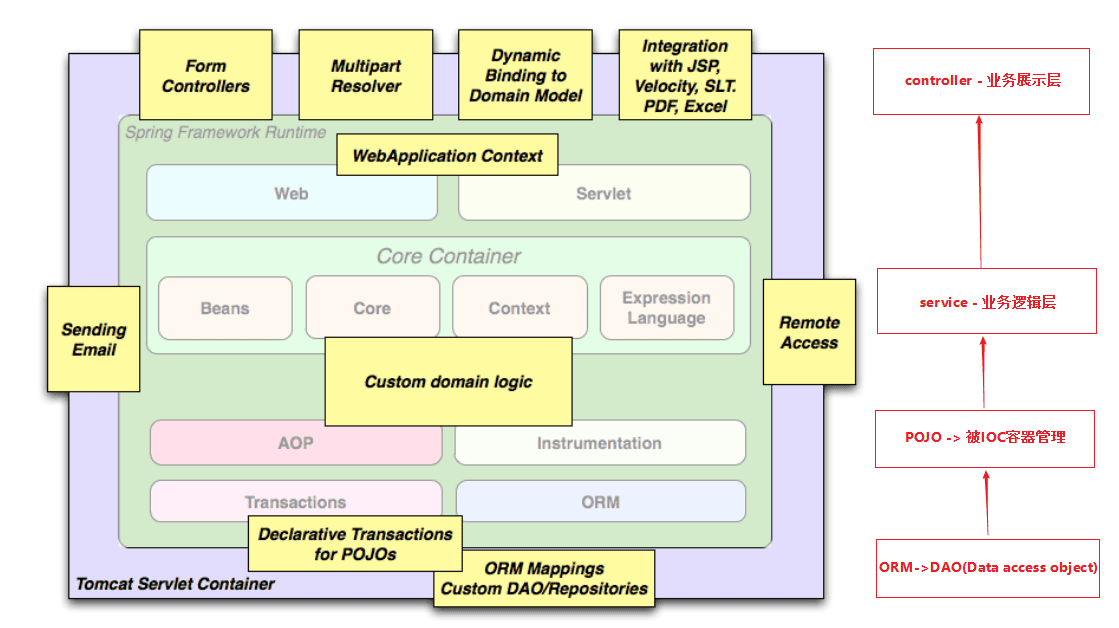
hello Spring
结合上面的使用场景,设计一个查询用户的案例的两个需求,来看Spring框架帮我们简化了什么开发工作:
- 查询用户数据 - 来看DAO+POJO-> Service 的初始化和装载。
- 给所有Service的查询方法记录日志
-
创建maven项目
-
添加pom依赖
1
2
3
4
5
6
7
8
9
10
11
12
13
14
15
16
17
18
19
20
21
22
23
24
25
26
27
28
29<properties>
<maven.compiler.source>8</maven.compiler.source>
<maven.compiler.target>8</maven.compiler.target>
<spring.version>5.3.9</spring.version>
<aspectjweaver.version>1.9.6</aspectjweaver.version>
</properties>
<dependencies>
<dependency>
<groupId>org.springframework</groupId>
<artifactId>spring-context</artifactId>
<version>${spring.version}</version>
</dependency>
<dependency>
<groupId>org.springframework</groupId>
<artifactId>spring-core</artifactId>
<version>${spring.version}</version>
</dependency>
<dependency>
<groupId>org.springframework</groupId>
<artifactId>spring-beans</artifactId>
<version>${spring.version}</version>
</dependency>
<dependency>
<groupId>org.aspectj</groupId>
<artifactId>aspectjweaver</artifactId>
<version>${aspectjweaver.version}</version>
</dependency>
</dependencies> -
创建用户实例 - User
1
2
3
4
5
6
7
8
9
10
11
12
13
14
15
16
17
18
19
20
21
22
23
24
25
26
27
28
public class User {
private String userName;
private Integer age;
public User() {
}
public User(String userName, Integer age) {
this.userName = userName;
this.age = age;
}
public String getUserName() {
return userName;
}
public void setUserName(String userName) {
this.userName = userName;
}
public Integer getAge() {
return age;
}
public void setAge(Integer age) {
this.age = age;
}
} -
配置dao层
1
2
3
4
5
6
7
8
9
10
11
public class UserDaoImpl {
public UserDaoImpl() {
}
/**
* forged a query instance of the findUserList method
*/
public List<User> findUserList(){
return Collections.singletonList(new User("wey",18));
}
} -
配置daos.xml
1
2
3
4
5
6
7
8
9
10
<beans xmlns="http://www.springframework.org/schema/beans"
xmlns:xsi="http://www.w3.org/2001/XMLSchema-instance"
xsi:schemaLocation="http://www.springframework.org/schema/beans
http://www.springframework.org/schema/beans/spring-beans.xsd">
<bean id="userDao" class="x.dao.UserDaoImpl">
<!-- additional collaborators and configuration for this bean go here -->
</bean>
<!-- more bean definitions for data access objects go here -->
</beans> -
配置服务层
1
2
3
4
5
6
7
8
9
10
11
12
13
14
15
public class UserServiceImpl {
private UserDaoImpl userDao;
public UserServiceImpl() {
}
// get the result of the forged a query instance of the findUserList method
public List<User> findUserList(){
return this.userDao.findUserList();
}
public void setUserDao(UserDaoImpl userDao){
this.userDao = userDao;
}
} -
配置services.xml
1
2
3
4
5
6
7
8
9
10
11
12
13
14
15
16
17
<beans xmlns="http://www.springframework.org/schema/beans"
xmlns:xsi="http://www.w3.org/2001/XMLSchema-instance"
xsi:schemaLocation="http://www.springframework.org/schema/beans
http://www.springframework.org/schema/beans/spring-beans.xsd">
<!-- services -->
<bean id="userService" class="x.service.UserServiceImpl">
<!-- ps:The ref attribute of the property may be marked red in IDEA,
but this does not affect the execution result -->
<property name="userDao" ref="userDao"/>
<!-- additional collaborators and configuration for this bean go here -->
</bean>
<!-- ps:If you don't want to see this red mark, add the following line of code -->
<!-- <bean id="userDao" class="x.dao.UserDaoImpl"/>-->
<!-- more bean definitions for services go here -->
</beans> -
配置aspect
1
2
3
4
5
6
7
8
9
10
11
12
13
14
15
public class LogAspect {
/**
* set aspect to get the name of the service method being done
* @param pjp
* @return
* @throws Throwable
*/
public Object businessService(ProceedingJoinPoint pjp) throws Throwable{
Method method = ((MethodSignature) pjp.getSignature()).getMethod();
System.out.println("execute method:"+method.getName());
return pjp.proceed();
}
} -
配置axpects.xml
1
2
3
4
5
6
7
8
9
10
11
12
13
14
15
16
17
18
19
20
21
22
<beans xmlns="http://www.springframework.org/schema/beans"
xmlns:xsi="http://www.w3.org/2001/XMLSchema-instance"
xmlns:aop="http://www.springframework.org/schema/aop"
xmlns:context="http://www.springframework.org/schema/context"
xsi:schemaLocation="http://www.springframework.org/schema/beans
http://www.springframework.org/schema/beans/spring-beans.xsd
http://www.springframework.org/schema/aop
http://www.springframework.org/schema/aop/spring-aop.xsd
http://www.springframework.org/schema/context
http://www.springframework.org/schema/context/spring-context.xsd
">
<context:component-scan base-package="x" />
<aop:aspectj-autoproxy/>
<bean id="logAspect" class="x.aspect.LogAspect">
<!-- configure properties of x.aspect here as normal -->
</bean>
<!-- more bean definitions for data access objects go here -->
</beans> -
实现App
1
2
3
4
5
6
7
8
9
10
11
12
13
14
15
16
public class App {
public static void main(String[] args) {
// create and configure beans
ApplicationContext context =
new ClassPathXmlApplicationContext("aspects.xml", "daos.xml", "services.xml");
// retrieve configured instance
UserServiceImpl service = context.getBean("userService", UserServiceImpl.class);
// use configured instance
List<User> userList = service.findUserList();
// print info from beans
userList.forEach(a -> System.out.println(a.getUserName() + "," + a.getAge()));
}
} -
项目结构
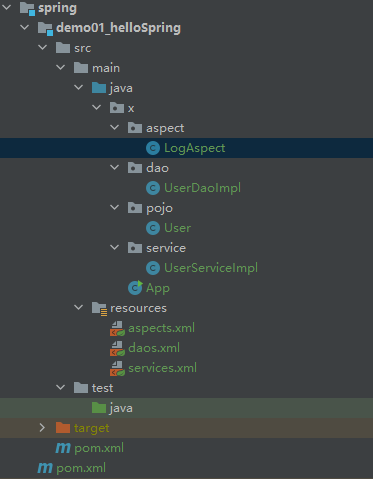
简化上述项目的配置
通过config简化配置
1 |
|
这种简化方式,没创建一个Bean都需要在config文件中去添加相应的映射。
⭐注解简化配置
1 |
|
🌟SpringBoot托管
SpringBoot实际上通过约定大于配置的方式,使用xx-starter统一的对Bean进行默认初始化,用户只需要很少的配置就可以进行开发了。